

Every commercial team that has tried to force a product or character into an AI video pipeline has felt the same quiet dread. You load the references, write the prompt, hit generate, and wait. The result is almost right—except the face drifts, the fabric fights the motion, or the product geometry collapses under a camera move you thought was locked. So you regenerate. Then regenerate again. Forty-two attempts later the credits are gone and the shot still isn’t handoff-ready.
That loop is the gacha. And on Seedance 2.5 it is expensive enough to change the economics of an entire short film.
The Real Cost of Blind Generation
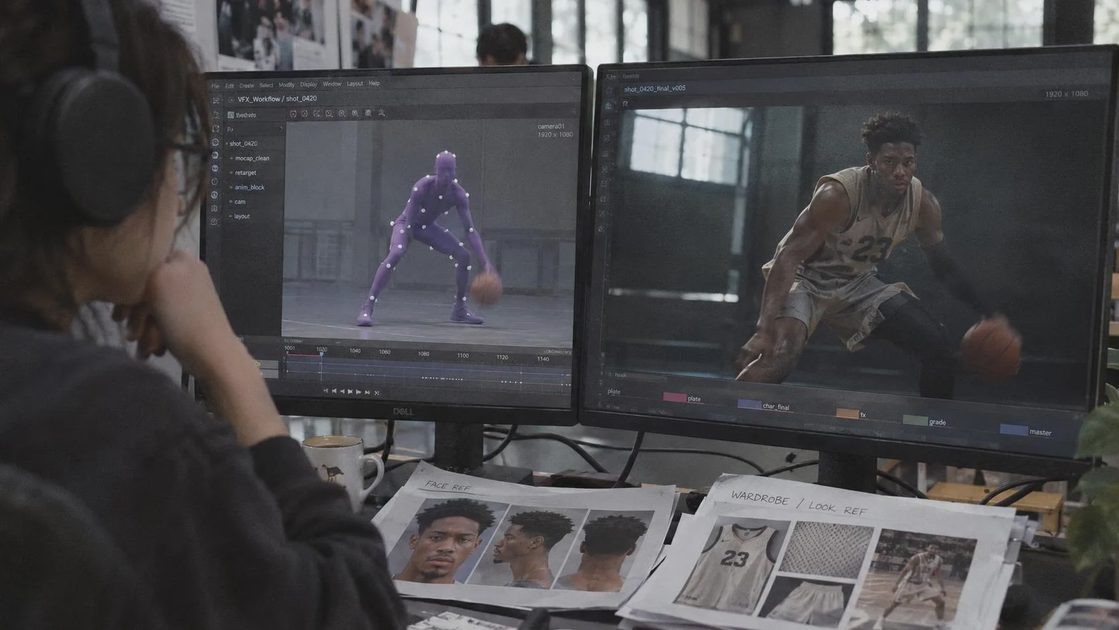
A single 10-second commercial shot can easily burn through the equivalent of several hundred dollars in credits when the average regeneration count sits around forty. Scale that across a ten-minute piece and the numbers become the kind of line item that makes producers start asking whether the AI path is still cheaper than a traditional shoot. The problem is not that the models are weak. The problem is that most teams still feed them a mixed signal: original motion, original appearance, new face, new wardrobe, new product, and a text prompt all at once. The model has no clean hierarchy of priorities, so it compromises everywhere.
Direct character or product swap tools on many platforms fail for the same reason. They treat the source clip as a single entangled blob. When you try to overwrite identity while preserving performance, the old silhouette bleeds through or the new clothing refuses to follow the underlying kinematics.
Even a naïve “drop some Blender cubes into the video model” approach collapses. Stiff primitive geometry leaks into the final character proportions. The model starts tracing the blocks instead of inventing a believable body. Previs only works when it is deliberately stripped of everything the final render is supposed to invent.
What Previs Actually Has to Do
Proper pre-visualization in this context is not about pretty animatics. It is about information separation.
Motion, camera path, spatial relationships, and editing rhythm live in one channel. Appearance—face, skin, wardrobe, product branding, materials—lives in another. Fine motor details and expressions that blocks cannot carry live in the prompt. When these three layers stay cleanly separated, the model no longer has to guess which constraint is sacred.
Two practical workflows emerge depending on whether the original performance can stay intact.
Workflow 1: Preserve the Original Motion (No 3D Required)
Start with a source clip that already has the performance you want—night-time basketball, a product turn, a walk cycle, whatever the brief demands. Feed it into a platform that can strip appearance (Higgsfield is one current option) and ask for a clean, faceless, clothing-free humanoid puppet that retains the exact motion and camera. The cost is trivial: a handful of credits for a usable motion guide.
That puppet becomes the sole motion authority. In the Seedance 2.5 interface you now upload:
the faceless Previs video,
multi-angle reference images of the target face,
wardrobe references (specific top, skirt, fabric behavior),
environment plates if the background must stay consistent.
The prompt language is explicit: motion follows the video; appearance follows the stills. One generation pass, roughly sixty credits, and the face and outfit swap cleanly. Total cost for a controlled result sits under eighty credits instead of the two-to-three-hundred range that repeated blind regeneration usually consumes.
The key discipline is refusing to let any appearance information leak into the Previs stage. The puppet must stay abstract.
Workflow 2: When You Need Mid-Shot Action Changes
Pure video-to-video Previs cannot easily insert a new gesture—sunglasses pulled from a pocket on landing, a shoulder adjustment, a product reveal that was never in the source. Forcing the video model to iterate on grayscale geometry burns the expensive credits you were trying to protect.
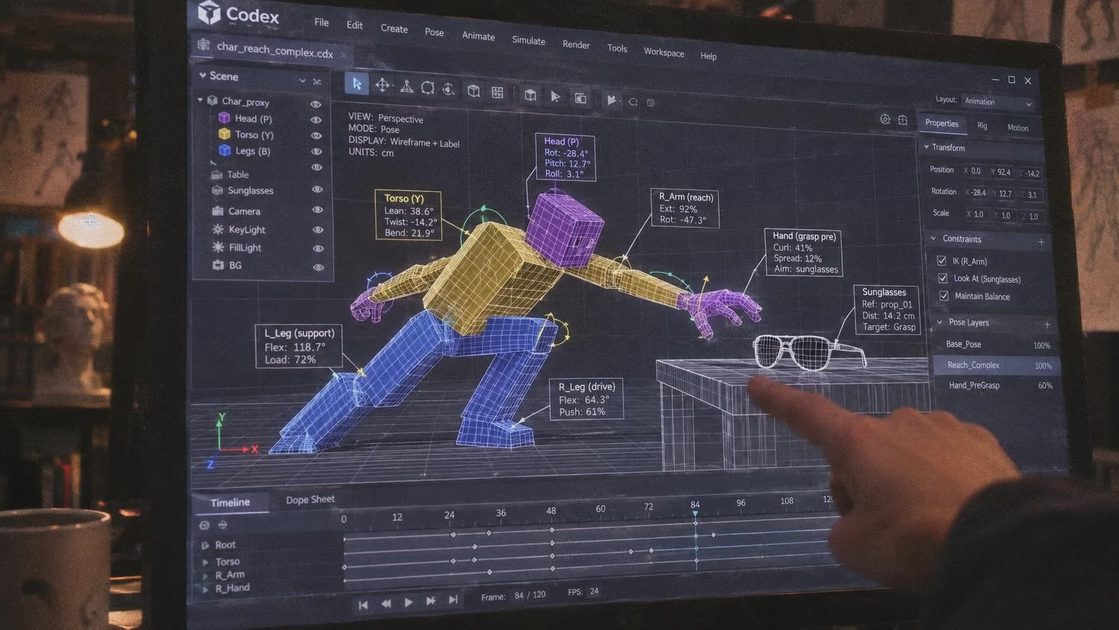
This is where a controlled 3D Previs stage becomes cheaper. Inside a Codex-style environment a capable model can drive Blender scripts that generate the required block animation. Because the heavy lifting stays in Blender, video credits remain untouched until the final render.
Three non-negotiable rules keep the blocks from contaminating the final image:
Radical simplification. Characters are three blocks: head, torso, legs. Props are basic boxes scaled to real-world proportions. Any micro-detail the model might latch onto is forbidden.
Strict color coding. Assign a unique, high-contrast color to every replaceable element—purple for the hero, yellow for the defender, cyan for background figures, orange for the sunglasses. Critically, those marker colors must not appear in the final wardrobe or product palette. Color collision is one of the fastest ways to create identity bleed.
Complete separation of duties.
Block Previs owns spatial placement, camera, and timing.
Reference stills own face, skin, clothing style, and product identity.
Text prompt owns only the fine details the blocks cannot express (finger articulation, expression micro-shifts, material response).
Iteration happens entirely inside Blender. Need the sunglasses to start folded and unfold on landing? Add a folded reference, update the prompt, re-render the blocks. Zero video credits spent. Only when the timing and spatial relationships are locked do you move to Seedance 2.5 with the final Previs, the color-mapped references, and a precise prompt. One clean generation at the normal single-shot cost.
Downstream Reality Checks
Previs controls motion and framing. It does not magically guarantee facial consistency or product branding across a sequence. That still depends on a unified reference library that every shot draws from. If the face pack drifts between cuts, the Previs cannot save you.
Rotating products introduce their own failure mode. Front and back of a Previs block must be painted in clearly opposing colors so the model cannot reverse the spin direction. Both front and back reference images of the real product or garment must be supplied; otherwise the model invents the unseen side and the handoff breaks under client scrutiny.
The same separation principle scales to stills. A rough composition sketch can be converted to a grayscale posture lock, then layered with model, wardrobe, and atmosphere references. The principle remains identical: lock what must not change before you generate what is allowed to invent.
Why This Survives the Handoff
Commercial pipelines do not care how clever the generation was. They care whether the shot can be reviewed, revised, finished, and delivered without reopening every decision. A clean Previs package plus a short handoff note that lists locked elements, primary references, known fragile sections, and revision scope turns an opaque AI take into something an editor or finishing artist can actually use.
The gacha tax disappears not because the models got smarter, but because the team stopped asking them to solve three problems at once. Motion is solved upstream. Appearance is solved by references. Fine detail is solved by prompt. Everything else is noise that costs money.
When the next brief lands with a custom product that must move exactly a certain way under a specific camera path, the question is no longer “how many times will we regenerate?” It becomes “how cleanly can we separate the information before we spend the first credit?” That is the only workflow that consistently survives the handoff.



No letters yet — be the first to write.